
| SobekCM Repository Community Help |
Abstract Element Help
Definition
Abstracts provide a summary of the content of the resource.1
Unformatted information that describes the scope and general contents of the materials. This could be a summary, abstract, annotation, review, or only a phrase describing the material. The level of detail appropriate in a summary may vary depending on the audience for a particular product. 2
Form Element
The online form element appears as below:
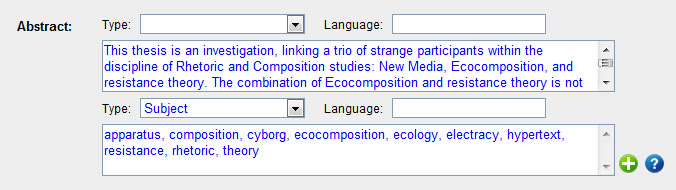
This form element allows the user to enter the abstract information, select the type, and declare the language of this summary or abstract. The possible types are:
- (Blank)
- Abstract (same as above)
- Content Advice
- Review
- Scope and Content
- Subject
- Summary
Other form elements for entering note information include Simplified Abstract.
Best Practices
The language of the abstract should be entered either by the ISO code, or by the term from the MARC Code List of Languages.
Best Practices for Oral Histories: in the abstract, include: a) interviewer’s name; b) interviewee’s name; c) address of the interview; d) date of the interview; and e) project name or reason for the interview.3
SobekCM / MODS Encoding
This data is encoded entirely in the MODS section of the SobekCM METS file.
<mods:abstract type="summary" displayLabel="Summary Abstract" lang="eng">
This is a sample abstract
</mods:abstract>
<mods:abstract lang="fin">Tämä on esimerkki abstrakteja</mods:abstract>
Metadata Mapping
MARC to MODS Mapping
The abstract maps from the 520 field in MARC.
- Text of the abstract is a concatenation of the |a subfield and the |b subfield (if present)
- Language of the abstract does not map from MARC, but the language is assumed to match the language of the catalog record, unless otherwise indicated.
- Type and display label of the abstract is determined by the first indicator as follows:
- (space) → summary
- '0' → subject
- '1' → review
- '2' → scope and content
- '4' → content advice
- otherwise, type is blank and display label is abstract
MODS to MARC Mapping
Mapping from the MODS back to MARC is generally the reverse of the procedure listed above.
Sources
- MODS User Guidelines Version 3, Detailed Description of MODS Elements
- MARC 21 Format for Bibliographic Data
- USF's Voices of Our Past, Guide to Conducting Oral History Interviews